 Stison Connector
What gets updated
What the app changes in your shop, where it comes from in Stison, and what it leaves alone.
Each time Stison send a title, the app writes that title's product again in full from what Stison hold. If you want a change to last, make it in Stison.
One product per title, one option per edition
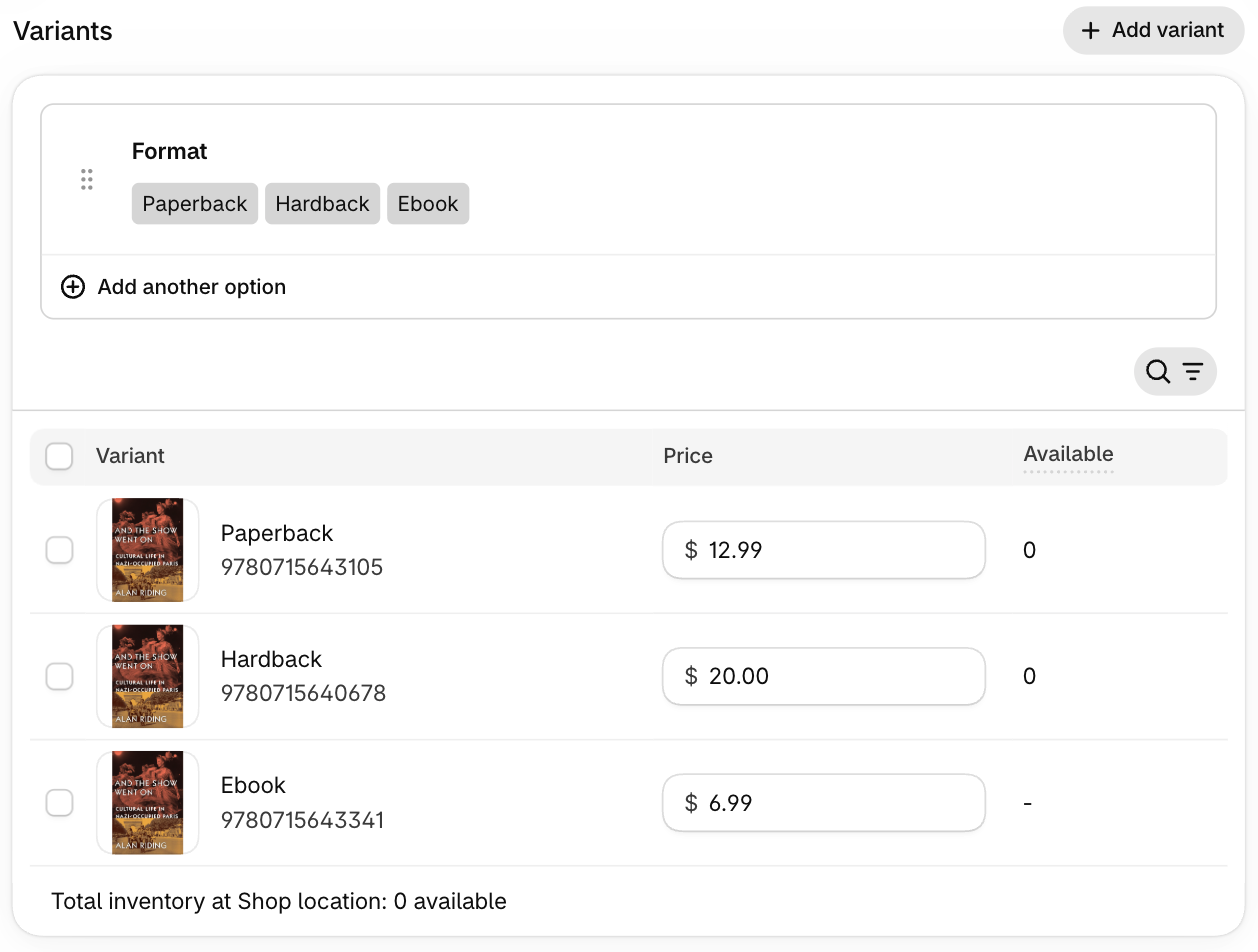
Each title becomes one product. Its editions become the options a customer picks from, which Shopify calls variants. The option is named Format.
For example, a novel published in paperback, hardback and ebook is one product with three formats: Paperback, Hardback and Ebook. The other format names are Kindle and Audiobook. If a title has two paperbacks (an old edition and a new one), they show as Paperback and Paperback #2.
Stison group editions into titles using their own work number. An audiobook usually has its own work number in Stison, so it usually becomes its own product.
Only editions that are Active or Forthcoming in Stison are shown. When an edition goes out of print, it drops off the product the next time that title is sent. A title with nothing Active or Forthcoming is archived.
What's on each product
- Title, subtitle and description, from Stison's title and Description fields.
- Cover. Stison's cover images are print quality and too large for Shopify, so the app shrinks each one to a web size before uploading it. Each edition gets its own cover.
- Vendor: every contributor's name, for example "Jane Smith & Tom Brown".
- Product type: Stison's own subject shelf, such as Fiction.
- Tags: your keywords from Stison, one tag each.
- Extra book details: series and number in the series, imprint, publication date, strapline, reviews, about the author, page count, prizes, language, subject codes and more.
Extra details are stored in custom fields that Shopify calls metafields. Think of them as extra labelled boxes on each product, beyond the ones Shopify has as standard. Your theme can show them on the product page. They all have names starting [Stison], so they're easy to find. The full list is in the app, on the Product fields and Variant fields pages.
New products are made visible on every sales channel your shop has when they're first created.
What's on each edition
- Price: Stison's recommended retail price in your shop's currency. If your prices include tax, that's the price including tax where Stison give one; if not, the price before tax where Stison give one. If Stison have no price in your currency for an edition, its pound price is used and the dashboard tells you how many. Library and export prices are ignored.
- SKU and barcode: the ISBN.
- Shipping: on for print, off for ebooks and audiobooks, so Shopify treats those as digital.
- Selling when out of stock: always allowed.
- Other details: publication date, size in millimetres, publishing status, availability, audiobook running time, prices in other currencies and sales rights (the countries each edition may be sold in).
Adding more of your Stison data
Stison hold more about each book than the app writes by default. The Map more feed data section on the app's Product fields page lets you add it.
Ready to use lists details the app already knows how to read: excerpt, endorsements, key selling points, audience and related products. Turn one on and the next file from Stison fills it in on each product, in a field whose name starts [Stison].
In your latest files, not mapped yet covers everything else, including fields your team has added in Stison for your own use. The app scans your latest files itself after each one Stison send, so the list stays current on its own; a couple of example values are shown with each piece of data so you can recognise it. There's also a Scan my latest files button if you want it updated right away.
For example, say your team keeps a "Reading group guide" note on each title in Stison. Once the app has seen a file with one, it shows up in the list with one of your own guides as the example. Click Map to a field, call it Reading group guide, choose multi line, and from the next file on each book has a [Stison] Reading group guide field your theme can show.
You choose whether the field goes on each edition (the paperback's value on the paperback, the ebook's on the ebook) or once on the product, taken from the first edition in the file.
Turning a field off stops the app writing to it and leaves what's already there. Remove field and values deletes the field from every product or edition. Like everything else here, a book with nothing in Stison for that field keeps whatever is in it now.
Authors
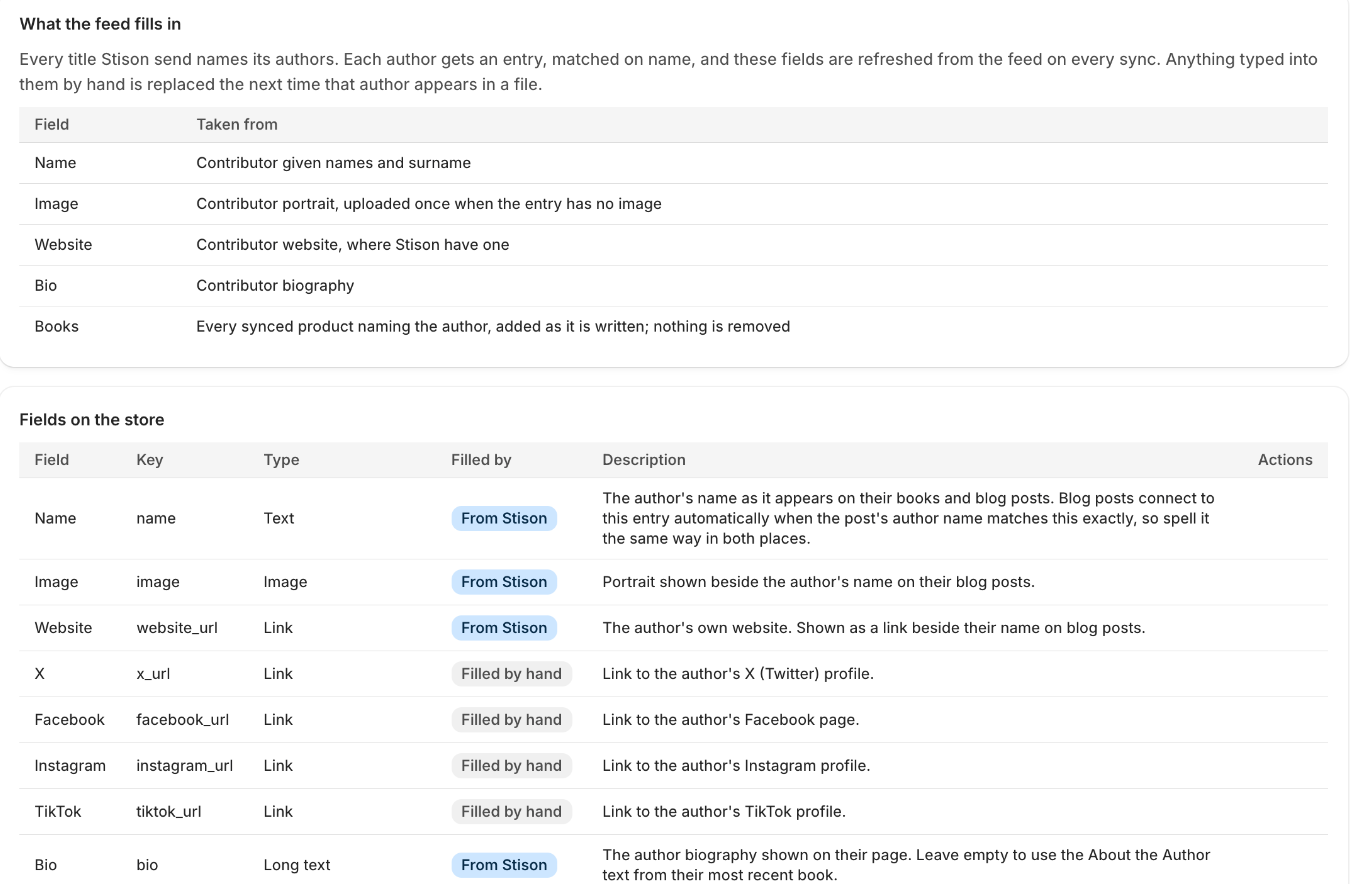
Each author gets an entry in your shop, which a theme can use for an author page. The app fills in the name, biography, website and portrait from Stison, and keeps a list of that author's books on the entry. If an author already has an entry with the same name, the app uses it rather than making another.
Stison don't hold social media links, so those are for you to fill in by hand. The app never overwrites them. On the Authors page in the app you can see every field and add your own, such as Agent.
Series ebook bundles
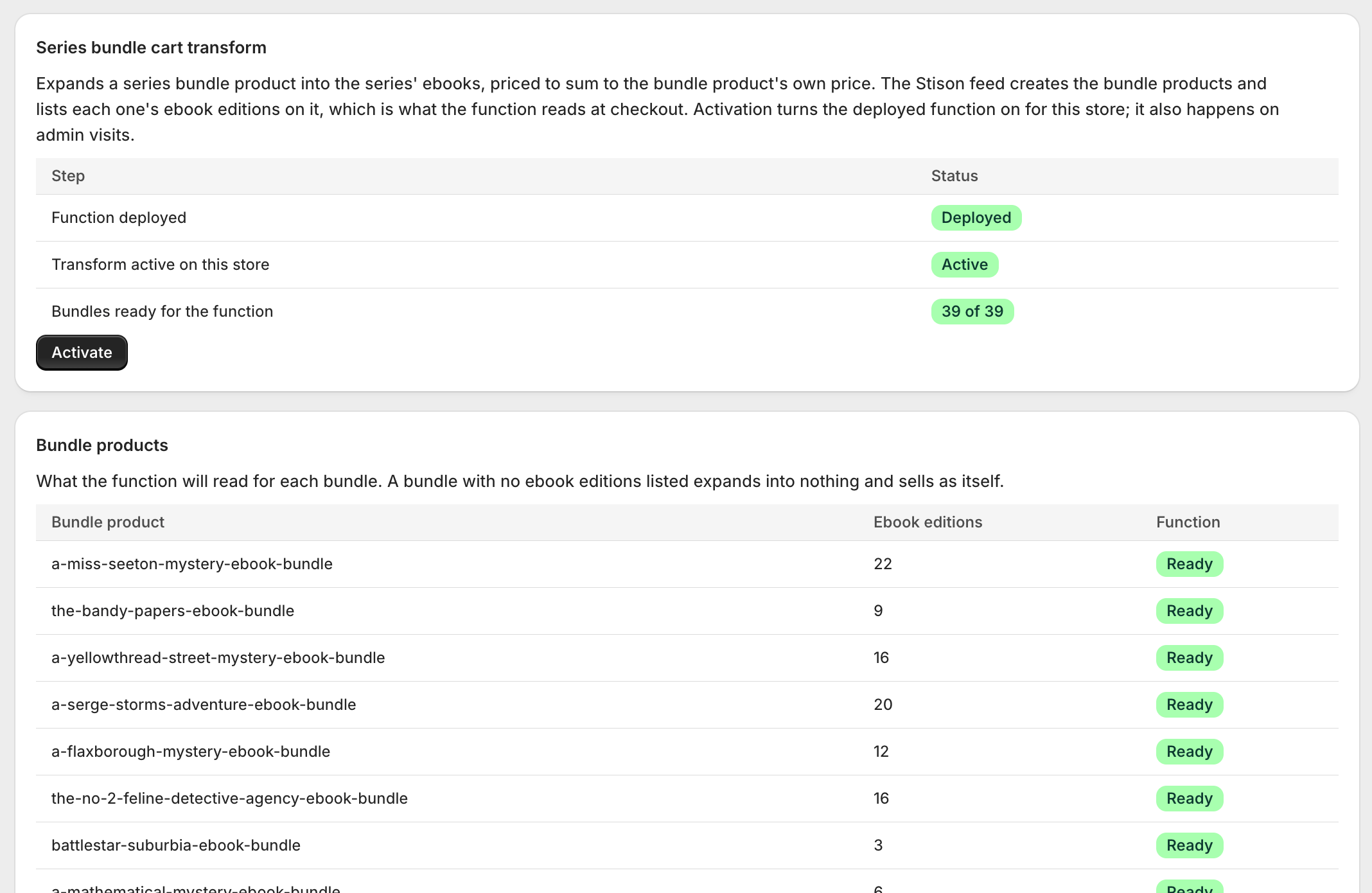
For a series with at least two numbered books that have ebook editions, the app makes one extra product: an ebook bundle. For example, a trilogy becomes "The Trilogy Ebook Bundle", which sells all three ebooks as one purchase.
- A new bundle is created as a Draft, so customers can't see it until you set it to Active.
- Its price starts as the ebook prices added together. After that the app never changes the price, so you can set a discount by hand.
- When a new book joins the series, the app adds it to the bundle's list of books.
- Box sets and omnibus editions aren't included, because Stison don't give them a number in the series.
At checkout the bundle is split into its separate ebooks, priced so they add up to the bundle's price. The Series bundles page in the app shows whether this is switched on for your shop, with an Activate button if it isn't.
The app doesn't show bundles specially on your shop's pages, and doesn't deliver ebook files. How your theme displays a bundle, and how the ebooks reach the customer, depends on your theme and your ebook delivery app.
Archiving titles no longer in the feed
If Stison send your whole catalogue and a title in your shop isn't in it, the app archives that product. Archived products are hidden from customers but not deleted. If a later file lists the title again, it's set back to Active.
As a safety net, this only happens when the file lists at least nine in ten of the titles the app has made. A small daily file, or a test send, never archives anything.
What is never touched
- Products the app didn't make. Anything without an ISBN from Stison, such as tote bags, gift cards or a special edition you added yourself, is left alone. Archiving only ever applies to products the app made.
- Details you typed by hand, when Stison have nothing. If Stison have no value for a detail (say, no strapline), the app leaves whatever is already there. It never blanks a field.
- A bundle's price, once it's been set.
- Author social links and any fields you add yourself.
- Nothing is ever deleted. Titles are archived, not removed.